Amazon Trade-In: Turn Old Devices Into Gift Cards (and Know When It’s Actually Worth It)
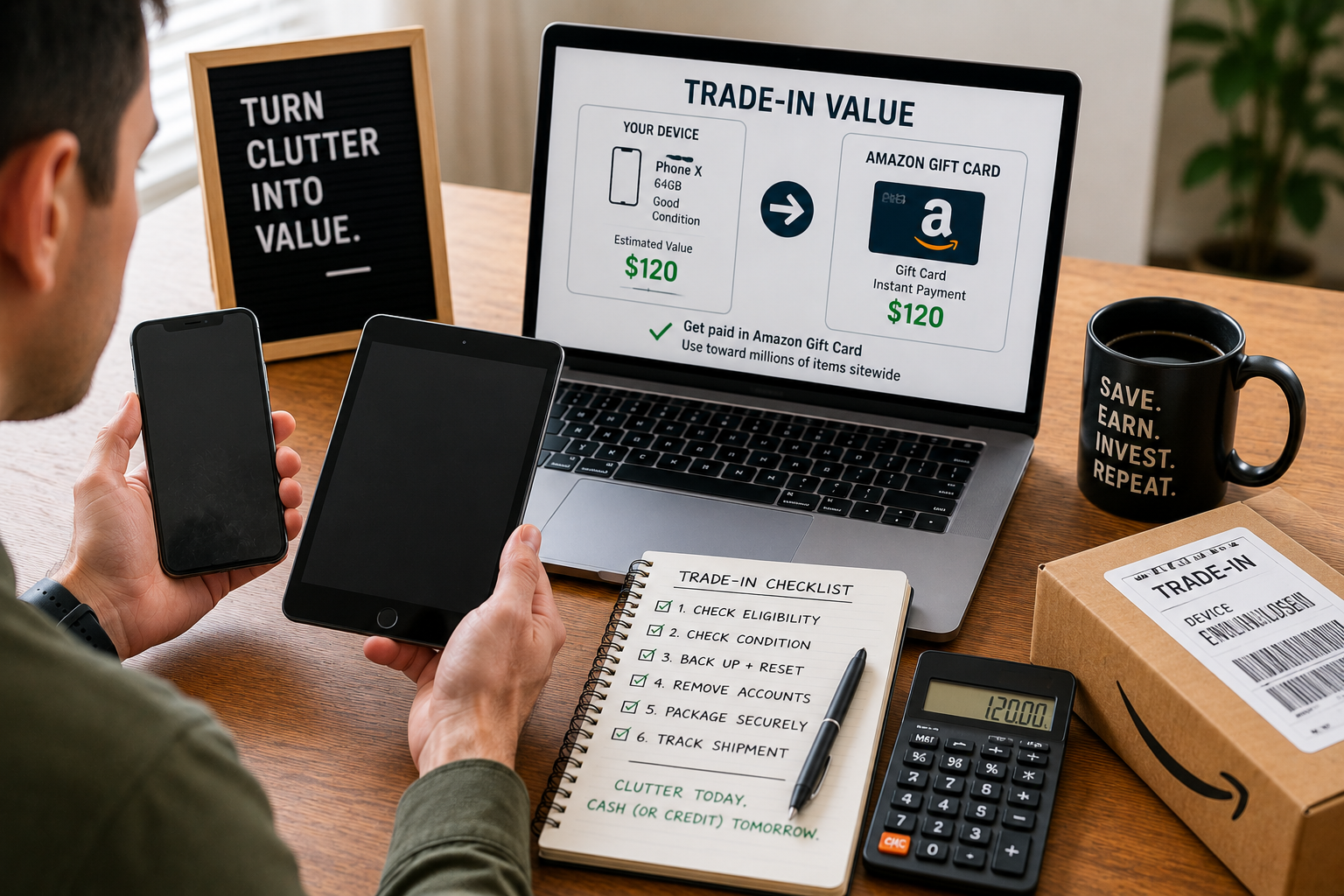
Amazon Trade-In can be one of the easiest ways to turn clutter into money you can actually use.
But it can also be one of the easiest ways to accept a low offer just because it feels convenient.
So this post is your True Wealth Moves guide to using Amazon Trade-In the smart way:
- what Amazon Trade-In is (and what you really get paid in)
- how “Instant Payment” works and why it matters
- what affects your trade-in value the most
- when Trade-In is better than selling locally (and when it’s not)
- the “trade-in vs resale” calculator logic (so you stop guessing)
- and the system to avoid the most common mistakes that cost people money
No hype.
No “side hustle” fantasy.
Just practical value.
What Amazon Trade-In actually is (plain English)
Amazon Trade-In is a program where you send in eligible items (often electronics, Amazon devices, and more), and Amazon gives you trade-in benefits — usually as an Amazon gift card credited to your account. In some cases you may also be eligible for an instant discount toward a new qualifying device.
Amazon also notes that eligible customers may receive Instant Payment, where the gift card benefit can be issued immediately when you create the trade-in order, before the item is received and verified. (Not everyone qualifies for Instant Payment.)
That’s the program in one sentence:
You trade in stuff you don’t use, and you get Amazon credit (gift card), sometimes plus an extra discount.
The first True Wealth Moves question: “Am I getting cash or store value?”
This matters.
Amazon Trade-In primarily pays you in Amazon value (gift card credit to your account), not cash.
That’s not automatically bad.
But it changes how you should think.
Gift card value is best when:
- you already buy essentials on Amazon (detergent, diapers, household basics, school supplies)
- you can use the credit on planned purchases
- you won’t treat the credit as “free money” and overspend
Gift card value is weaker when:
- you’re cash-tight and need money for rent/bills
- you’re trying to reduce spending on Amazon
- you’re tempted to use credit on random wants
So before you trade anything in, ask:
“Will this gift card actually reduce my spending, or will it increase my spending?”
That is the difference between savings and a spending loop.
How the trade-in process works (simple and realistic)
Amazon’s Trade-In flow is generally:
1) You choose the item and answer condition questions
2) Amazon provides instructions (shipping label or drop-off options depending on item and location)
3) You send the item
4) Amazon receives and verifies it
5) Amazon applies the gift card to your Amazon account (unless you qualified for Instant Payment, which happens earlier)
Amazon notes that some verification timelines can take up to 20 business days after they receive your trade-in item, depending on the item and verification process.
That’s why this is not a “today money” plan for everyone unless Instant Payment is offered to you.
Instant Payment: the feature people misunderstand
Instant Payment (when available) can issue the gift card immediately when you create the trade-in order.
But here’s the real-life thing:
Instant Payment is not a guarantee for every trade-in or every customer.
So the True Wealth Moves rule is:
Plan as if you’ll get paid AFTER verification — and treat Instant Payment as a bonus if it shows up.
That keeps your budget stable.
What affects your trade-in value the most
Trade-in value is mainly driven by:
- model and age
- condition grading
- whether it turns on and functions
- screen condition (especially phones/tablets)
- accessories included (sometimes)
- and whether the item matches the condition you claimed
Amazon’s terms describe that if the condition you report doesn’t match what they verify, your trade-in value can change, and the outcome depends on the program rules and your choices.
So if you want to protect your value:
Be honest about condition.
And document it.
The “Don’t Get Downgraded” checklist
Most people lose value because they ship sloppy.
Do this instead:
1) Take 8 photos before shipping
- front and back
- all corners
- close-ups of damage
- screen on (if possible)
- serial/IMEI label (if applicable)
This protects you if there’s a dispute.
2) Reset and sign out properly
Amazon’s own content and help flows emphasize prepping devices (deregister, unlock, wipe) before shipping.
3) Pack it like you actually care
Use a padded mailer or sturdy box.
If the device gets damaged in shipping, you can lose value.
4) Ship fast and track it
Trade-in instructions include label printing and packing slips.
If you delay, you risk missing program windows.
The real question: Trade-In vs selling — which is better?
This is where most people guess.
We don’t guess.
We use a simple “net value” comparison.
Trade-In wins when:
- you value convenience highly
- resale would take time you don’t have
- the item’s resale value is low (but trade-in is still decent)
- you want the extra device discount (when offered) on something you already planned to buy
Selling wins when:
- the item has strong resale value (newer iPhones, popular consoles, current tablets)
- you need cash, not Amazon credit
- you’re comfortable listing and shipping (or selling locally)
- you can tolerate buyer messages and returns
True Wealth Moves rule:
Trade-in is convenience-first.
Selling is value-first.
The “Net Value Calculator” (you can do this in 60 seconds)
Before you decide, estimate both outcomes:
Option A: Amazon Trade-In Net Value
Trade-In Gift Card Value
- (Any bonus discount you will actually use)
= Total Trade-In Net Value
Option B: Selling Net Value
Expected sale price
- platform fees (if any)
- shipping (if any)
- your time cost (optional, but be honest)
= Selling Net Value
If Selling Net Value is meaningfully higher (example: $60–$150+ difference), sell.
If the difference is small (example: $10–$40), trade-in is often worth it because it’s easier.
The table: when Amazon Trade-In is worth it
Amazon Trade-In value decision table comparing trade-in vs selling and best use cases
| Situation | Trade-In usually wins if… | Selling usually wins if… | Best move |
|---|---|---|---|
| Old Amazon device (Echo/Fire/Kindle) | you want convenience + possible device discount | resale value is surprisingly high locally | compare both, but Trade-In often fine |
| Newer phone/tablet | trade-in offer is close to resale | resale is much higher | sell if difference is big |
| Damaged device | Trade-In still accepts with reduced value | resale becomes hard (returns, disputes) | Trade-In can be the clean exit |
| Need cash for bills | Trade-In is gift card only | selling pays cash | sell (cash is priority) |
| You buy Amazon essentials anyway | gift card reduces planned spend | you’d overspend with credits | trade-in only if you track credits |
| You’re upgrading an Amazon device | bonus discount is available and you were buying anyway | you weren’t planning to buy | use discount only for planned upgrades |
This table keeps you from making emotional decisions.
The “Gift Card Discipline” rule (so Trade-In becomes savings)
A gift card is either:
- a discount on your next essential purchase, OR
- a permission slip to buy random stuff.
You decide which.
Here’s the True Wealth Moves rule:
When you receive Trade-In credit, reduce your next Amazon budget by that exact amount.
Example:
You get a $45 gift card.
Your next Amazon order budget is reduced by $45.
If your normal budget is $100, now you can spend $55 cash + $45 credit.
That’s how Trade-In becomes savings (not extra spending).
Bonus discounts: powerful, but easy to misuse
Amazon’s Trade-In marketing and help content indicates that eligible trade-ins can also come with promotional discounts toward qualifying Amazon devices.
Here’s the rule:
A discount is only valuable if you were already going to buy the item.
If the discount makes you buy something you weren’t planning to buy, it’s not savings.
It’s upselling.
So use the discount like a CFO:
- only for planned upgrades
- only if you can pay cash (or pay the card in full)
- only if the total value is better than other options
What you should trade in (smart categories)
Trade-In is most useful for:
- older devices you don’t want to list
- Amazon devices (Kindle, Echo, Fire) when a promo discount exists and you were planning an upgrade
- devices with cosmetic wear where resale might be annoying
- items you’ve been procrastinating getting rid of for 2+ years
Trade-In is less ideal for:
- high-demand newer phones and consoles (often better resale)
- collectibles or rare items
- anything you could sell locally instantly for strong cash
The “trade-in prep” checklist (do this every time)
Before you submit:
1) Confirm item is eligible in Trade-In portal
2) Read the condition categories carefully
3) Take photos
4) Factory reset / remove accounts (deregister/unlock)
5) Pack securely
6) Track shipment and save proof
This prevents 90% of headaches.
What to do if the trade-in value changes after inspection
Sometimes Amazon’s inspection may grade the device differently than you expected, which can change the value.
Your move:
- Review the update in your trade-in status page
- Decide whether to accept (if options are offered)
- Use your photos as evidence if you believe the condition was misjudged
The key is staying calm and documenting.
How to use Trade-In to make money (legit, low risk)
You asked how people can “make money off” companies.
Let’s be careful and practical:
Amazon Trade-In is not usually a profit business model for most people.
It’s a “value recovery” model.
But you CAN create value in three realistic ways:
1) Turn clutter into planned spending power
Trade in old devices → gift card → buy essentials you would buy anyway.
That effectively converts clutter into savings.
2) Use it as a “discount tool” for an upgrade you already planned
If a promo discount is available for a device you already planned to buy, you’re reducing your cost.
3) Side hustle (advanced): only if you understand risk
Some people buy old Amazon devices cheaply to access a promo discount. This can work occasionally, but it has risks:
- promo rules change
- device eligibility changes
- time and shipping cost can erase profit
- it can encourage unnecessary purchases
True Wealth Moves advice:
Start with your own items first. Don’t build a “trade-in hustle” until you’ve mastered the basics.
The “one-weekend Trade-In reset” plan
If you want fast progress, do this weekend plan:
Saturday:
- Gather all unused devices in one place
- Separate into: “sell,” “trade-in,” “trash/recycle”
- Check Amazon Trade-In eligibility for trade pile
- Take photos and prep devices (reset/unlock)
Sunday:
- Submit trade-ins
- Print labels or schedule drop-off
- Create a note tracking: item, expected value, date sent, status
This turns clutter into value quickly without chaos.
Your one evergreen external link (exactly one)
Use Amazon’s official Trade-In hub page as your single external link in the post:
https://www.amazon.com/l/9187220011
Two True Wealth Moves internal links (exactly two)
https://truewealthmoves.com/wealth-blog/
https://truewealthmoves.com/resources/
Final truth
Amazon Trade-In is a great tool when you use it with rules.
It wins when:
- you want convenience,
- you can use gift card value for planned essentials,
- you document condition,
- and you don’t let credits turn into impulse spending.
If you treat Trade-In like a system — not a random click — you can turn unused devices into real savings and keep your money moving forward.
Looking for More Finance Topics?
Use the search box below to explore hundreds of articles on True Wealth Moves — we’ve probably already written about what you’re looking for.